Here is how to calculate cumulative sum or count by using R built-in datasets.
Cumulative sum in R
Here is data from the R built-in airpassanger dataset. This data comes in time-series format and first of all, I will create a data frame.
The cumulative sum is calculated by using function cumsum.
am <- data.frame("year" = time(airmiles), "miles" = airmiles)

am$cm_miles <- cumsum(am$miles)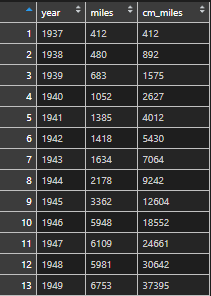
Cummulative calculation within group in R
Sometimes cumulative sum is needed within the group. For example withing year, month or whatever.
You can do it by adding group_by from dplyr.
require(dplyr)

# select data from Starwars dataset
sw <- starwars %>%
  select(name, species, mass) %>%
  filter(!is.na(mass)) %>%
  arrange(species)

# calculate cumulative sum of mass by species
sw <- sw %>%
  group_by(species) %>%
  mutate("cm_mass" = cumsum(mass))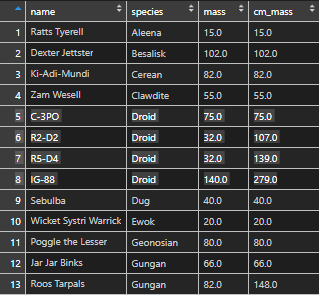
In this example, I was actually running into dplyr unused argument error, because select is also in MASS. Check out this post on how to deal with that.
Cummulative count or group index in R
You can do it in at least two different ways. I’m continuing the previous example.
# create column with 1
sw$rec <- 1

# calculate cumulative count
sw <- sw %>%
  group_by(species) %>%
  mutate("cm_count" = cumsum(rec)) %>%
  select(-rec) # remove column that is not needed


library(data.table)

sw$cm_count2 <- rowid(sw$species)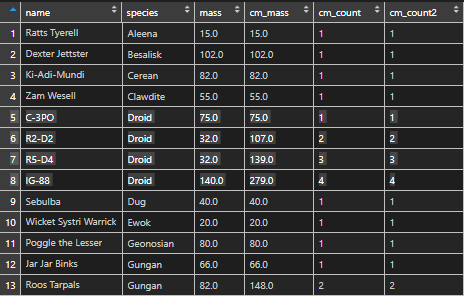
Leave a Reply