Here is a simple way how to combine CSV or text files with R and, at the same time, add a column with filenames. Here is all the code with more detailed explanations below.
require(dplyr)
require(data.table)

# read file path
all_paths <-
  list.files(path = "~/txt_files/",
             pattern = "*.txt",
             full.names = TRUE)

# read file content
all_content <-
  all_paths %>%
  lapply(read.table,
         header = TRUE,
         sep = "\t",
         encoding = "UTF-8")

# read file name
all_filenames <- all_paths %>%
  basename() %>%
  as.list()

# combine file content list and file name list
all_lists <- mapply(c, all_content, all_filenames, SIMPLIFY = FALSE)

# unlist all lists and change column name
all_result <- rbindlist(all_lists, fill = T)
# change column name
names(all_result)[3] <- "File.Path"
I have 3 txt files, and each of them contains Tab-delimited movie data from IMDB.
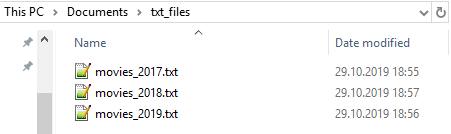
To combine files with R and add filename column, follow these steps.
1. Read paths to files
all_paths <-
  list.files(path = "~/txt_files/",
             pattern = "*.txt",
             full.names = TRUE)
2. Read file content
all_content <-
  all_paths %>%
  lapply(read.table,
         header = TRUE,
         sep = "\t",
         encoding = "UTF-8")
3. Read file names
all_filenames <- all_paths %>%
  basename() %>%
  as.list()
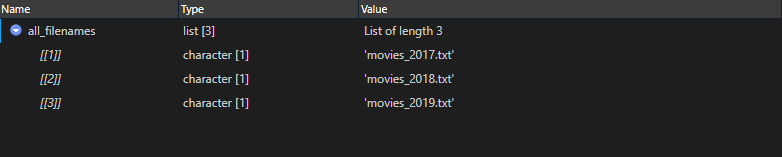
4. Combine file content list with filename list
all_lists <- mapply(c, all_content, all_filenames, SIMPLIFY = FALSE)

5. Unlist result and do some finalization
all_result <- rbindlist(all_lists, fill = T)
# change column name
names(all_result)[3] <- "File.Path"

It is also possible to do that at once.
# all process in one

all_txt <- rbindlist(mapply(
  c,
  (
    list.files(
      path = "~/txt_files/",
      pattern = "*.txt",
      full.names = TRUE
    ) %>%
      lapply(
        read.table,
        header = TRUE,
        sep = "\t",
        encoding = "UTF-8"
      )
  ),
  (
    list.files(
      path = "~/txt_files/",
      pattern = "*.txt",
      full.names = TRUE
    ) %>%
      basename() %>%
      as.list()
  ),
  SIMPLIFY = FALSE
),
fill = T)
Please, check other R related posts that might be interesting for you.
Leave a Reply